

Norm Standards
Norm editions (e.g. “ISO 9001:2015”, “ISO 9001:2026”) are their own master data — not a free-text field on audit criteria. That makes a second norm edition its own versioned criteria tree that you audit against from a cutover date, instead of a convention that can’t be enforced or reported on.
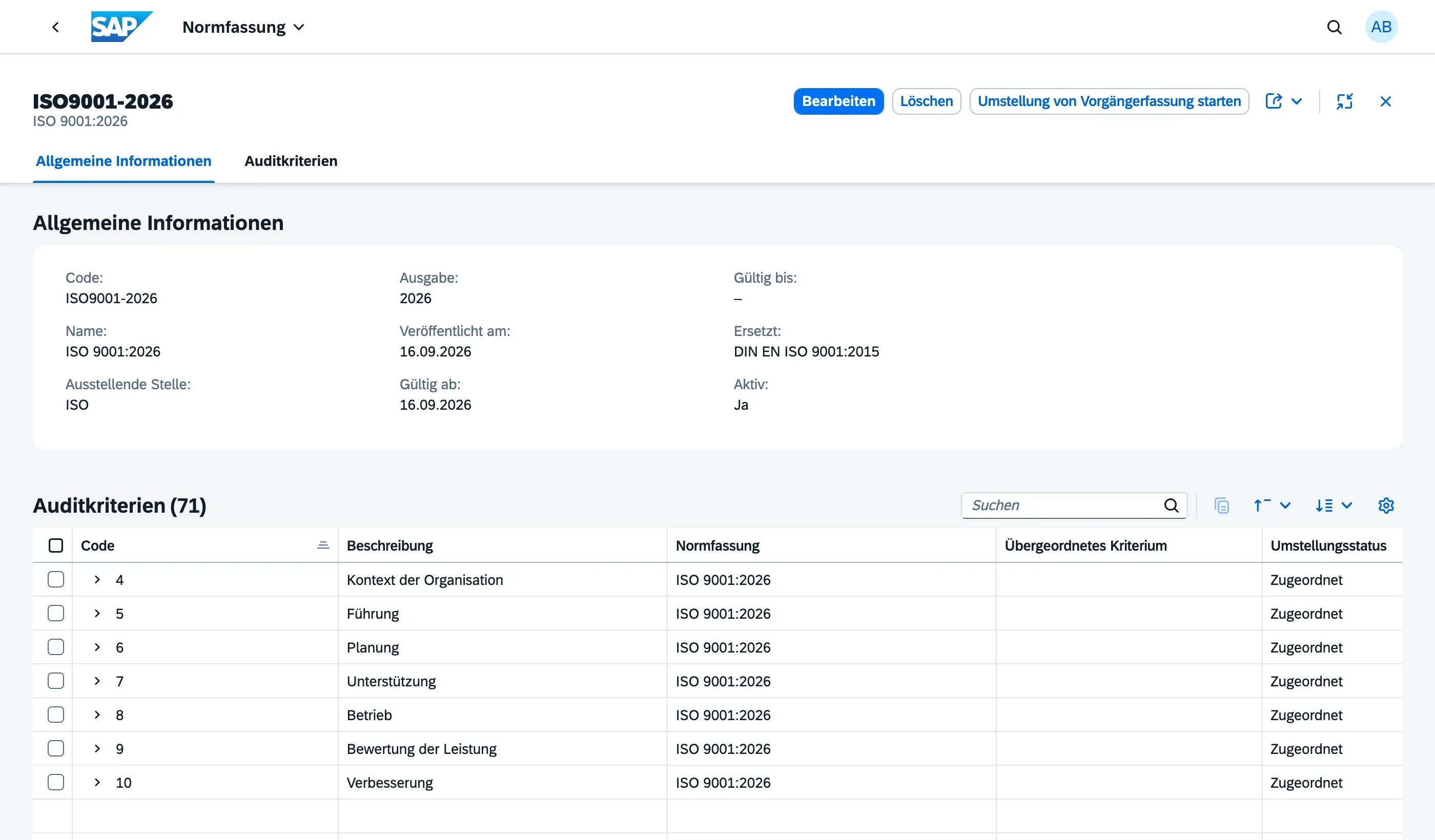
Fields of a Norm Standard
Section titled “Fields of a Norm Standard”| Field | Description |
|---|---|
| Code | Unique short code, e.g. ISO9001-2026 |
| Name | Display name, e.g. “ISO 9001:2026” |
| Issuing Body | The issuing organization, e.g. ISO, DIN, IATF, or “internal” for your own procedures |
| Edition | The edition label, e.g. “2026” |
| Published On, Valid From, Valid Until | Dates tracking the norm’s history |
| Supersedes | Reference to the norm edition this one replaces (e.g. “ISO9001-2026” points at “ISO9001-2015”) |
| Active | Whether the norm edition is currently selectable |
Audit Criteria per Norm Standard
Section titled “Audit Criteria per Norm Standard”Each norm edition has its own hierarchical Audit Criteria tree — maintained on the norm edition’s object page under the Audit Criteria tab. Two norm editions never share criteria: when a standard is revised, you create the new clauses under the new norm edition, regardless of how many of them are unchanged in content from the old one.
Mapping criteria across a norm changeover
Section titled “Mapping criteria across a norm changeover”For reporting (e.g. findings by clause) to keep working across a changeover point, you need to record how criteria correspond between two editions. A mapping always connects two criteria of one standard’s own Supersedes pair — a predecessor-edition clause to a successor-edition clause.
Every mapping carries a Mapping Type:
| Type | Meaning | Example |
|---|---|---|
| Identical | Clause unchanged, just re-mapped | 4.4 → 4.4 |
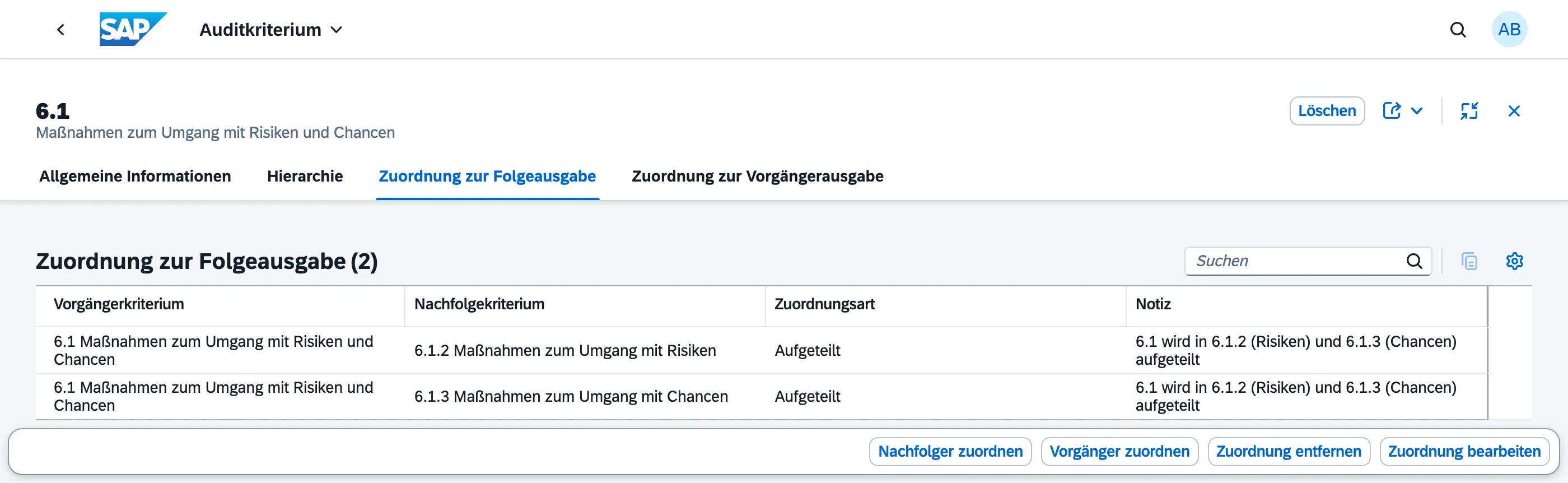
| Split | One old criterion becomes several new ones | 6.1 → 6.1.2 and 6.1.3 |
| Merged | Several old criteria become one new one | 10.1 and 10.3 → 10.1 |
| Changed | Clause persists, content changes materially | 4.1/4.2 (climate change aspect) |
A clause that simply has no counterpart in the other edition — a new requirement with no predecessor, or an old clause that was dropped — isn’t a mapping type. Mark it directly on the criterion instead, via No Counterpart in Paired Edition: this distinguishes “not reviewed yet” from “deliberately has none,” which the completeness view below relies on.
The changeover workbench
Section titled “The changeover workbench”Rather than opening one criterion at a time, work through an entire edition change from the Norm Standards object page: the Start Changeover header action (shown on any standard that itself supersedes another) opens a list of every criterion on both sides of that pair, with a Changeover Status column showing, per row:
- Mapped — the criterion has at least one mapping, as either side
- No Counterpart — confirmed via the checkbox above, no mapping expected
- Open — not yet reviewed
The same view works in both directions, so a new-edition clause with no incoming mapping is just as visible as an old-edition clause with no outgoing one. Add, change, or remove a mapping directly from this list, or from an individual criterion’s object page under Mapping to Successor Edition / Mapping to Predecessor Edition — both stay in sync, and the counterpart picker only ever offers criteria from the paired edition.
A flat, cross-standard list of every audit criterion — useful for search, independent of which standard’s object page you started from — is also available directly from the launchpad under All Audit Criteria.
Carrying a question catalog forward to a new edition
Section titled “Carrying a question catalog forward to a new edition”A question catalog can optionally be tagged with the Norm Standard it was written against. Once your criteria mapping for a changeover is far enough along, use Carry Forward to New Standard on the catalog’s object page: pick the target edition and a new version label, and a copy of the catalog is created for it, with every question’s criterion reference carried over wherever the mapping resolves it unambiguously.
Some questions can’t be resolved automatically — a criterion that was split into several successors, one with no mapping yet, or content that changed enough to warrant a second look even though the reference itself is clear. Those are flagged with Criteria Needs Review on the new catalog rather than guessed; filter the question list to that flag to work through them. The original catalog is never touched by this — only a new copy is created.
Managing Norm Standards
Section titled “Managing Norm Standards”Norm Standards and their audit criteria are maintained by your Master Data Admin in the Norm Standards app.
Next Steps
Section titled “Next Steps”- Audit Criteria — the structure and use of the criteria themselves
- Audits — how an audit is pinned to a norm edition